Exploring Educational Technology

Category: Weekly Reflections

This is the category to apply to your weekly reflection posts from the course.

Inquiry, Technology and Educational Tools

Inquiry Through Technology
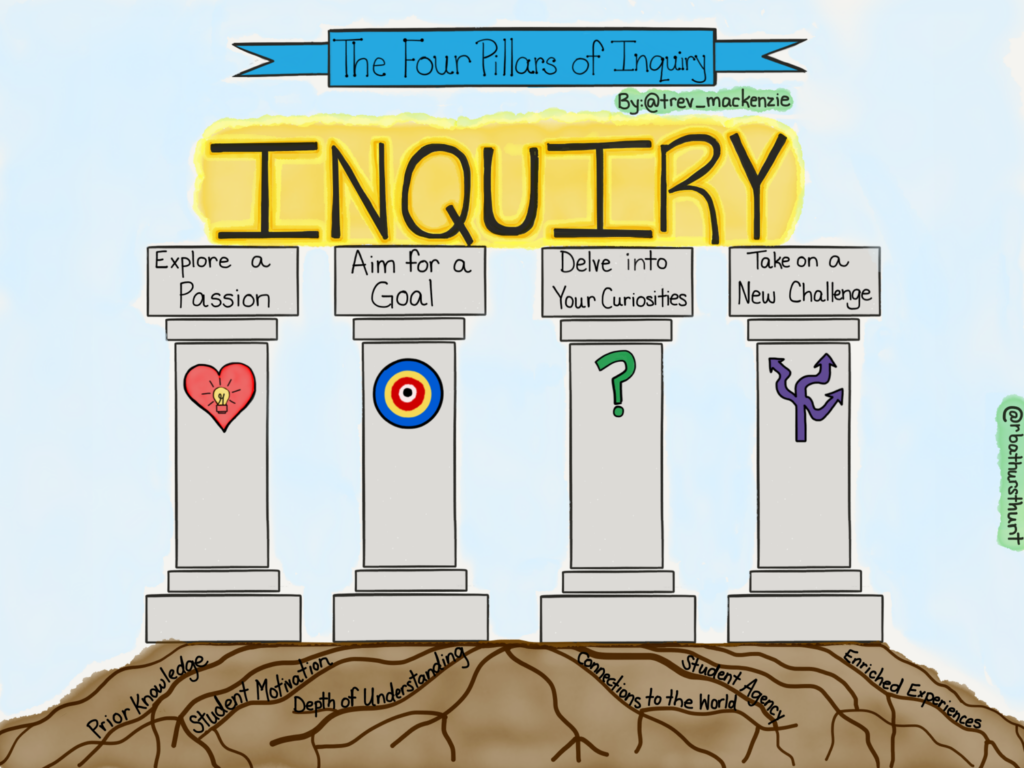
Image taken from Trevor Mackenzie

Inquiry-based learning is a student-centred approach that positions the educator as the facilitator and the student as a self-driven participant in their learning process. Bringing technology into this process opens up the world for students. When adults are curious to learn something, they immediately go to the Internet and use different technological tools to gain information and convey that information. Students should learn to take part in this process as well.
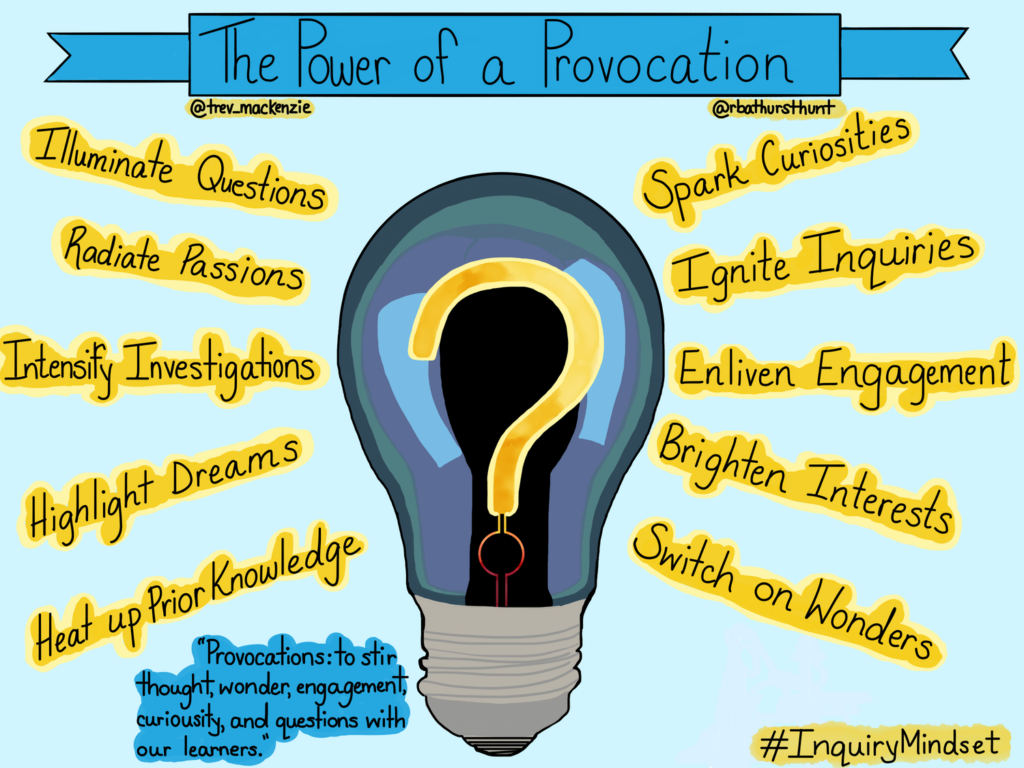
Image taken from Trevor Mackenzie

There are four different types of inquiry: structured, controlled, guided and free. The types gradually release responsibility and provide students with more opportunities for open engagement. Each has its place and will depend on the content, curriculum, and educator.
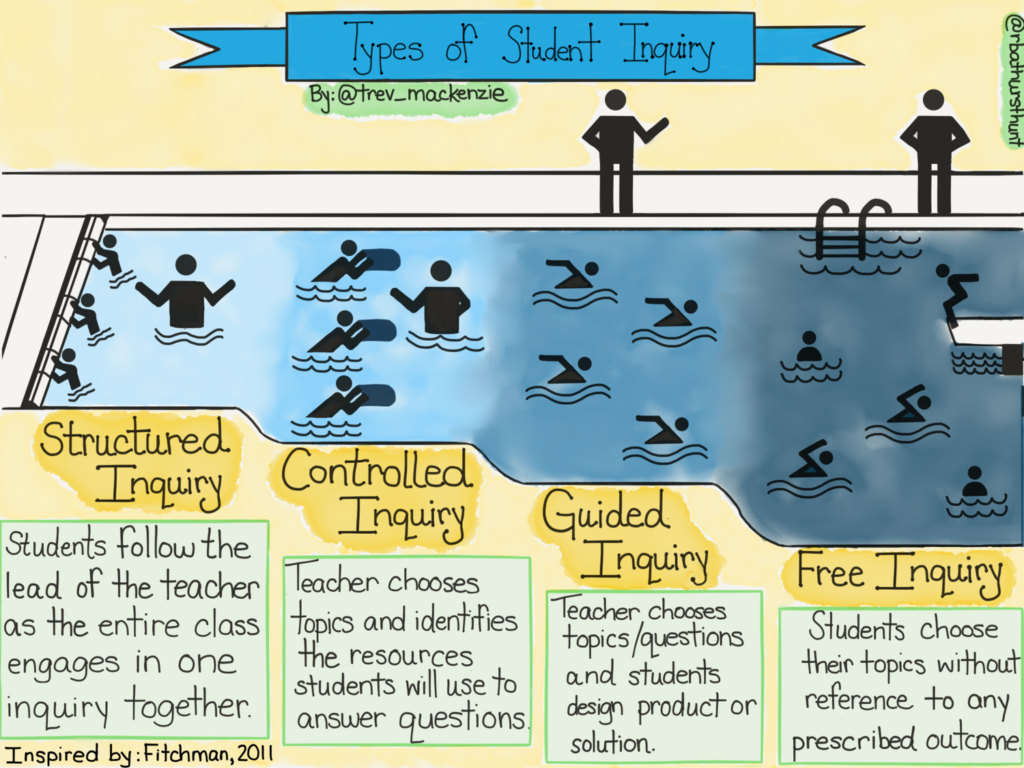
Image taken from Trevor Mackenzie

For students, the process of inquiry is incredibly valuable for future academic and career contexts. I feel that some of this process can be transferred into the Scientific experimental process. Students are given an active role in their learning and must come to terms with this process. This creates a whole lot of growth.
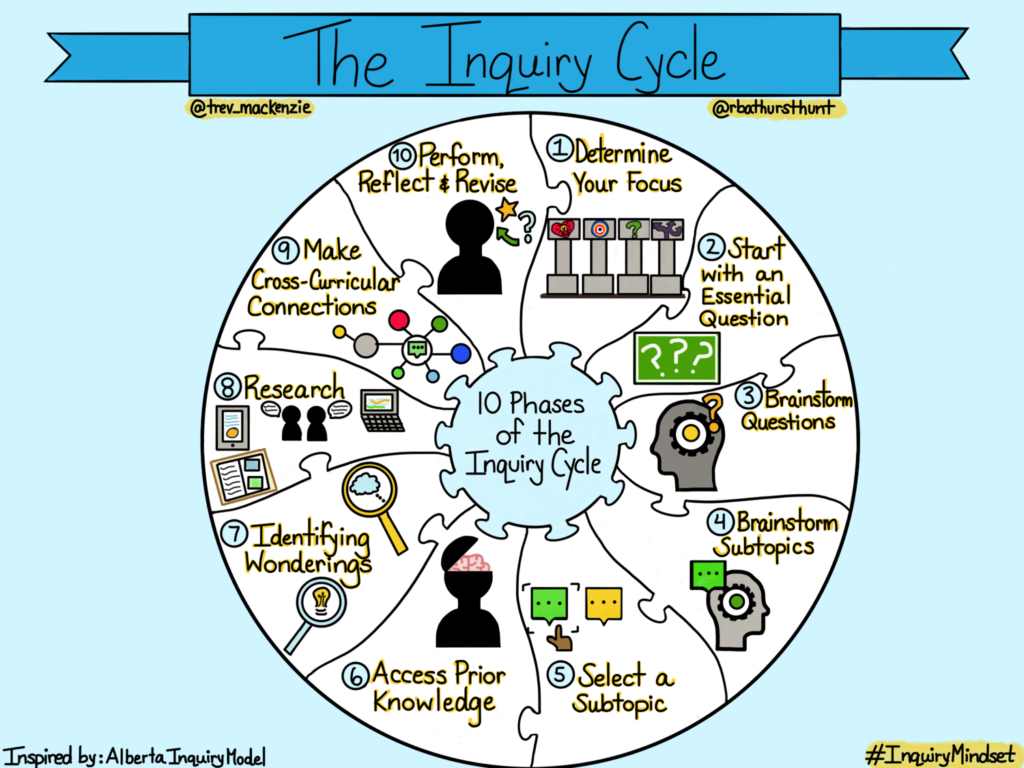
Image taken from Trevor Mackenzie

Joanna Lake’s Presentation

From Joanna Lake’s powerful presentation, I was able to gain some important insights into teaching. Some include:

-Be your authentic self.

-Share your interests with your students.

-Do one thing that works really well for you

-Go really slowly.

-Don’t stay at school really late.

-“First, then” for task sequences

In particular, I found what she said about visuals very valuable. “You can never have too many images, infographics, displays or visuals.” These are powerful ways to present information to students while keeping them engaged. Using visuals as a prompt can be a great way to start a lesson or discussion. As well, she suggested using memes and to check in with emojis or memes. Finally, she praised the visual schedules because they help students, especially those with disabilities, see and refer to the routine of the day. All of these visuals are powerful for students and technology can really help this process.
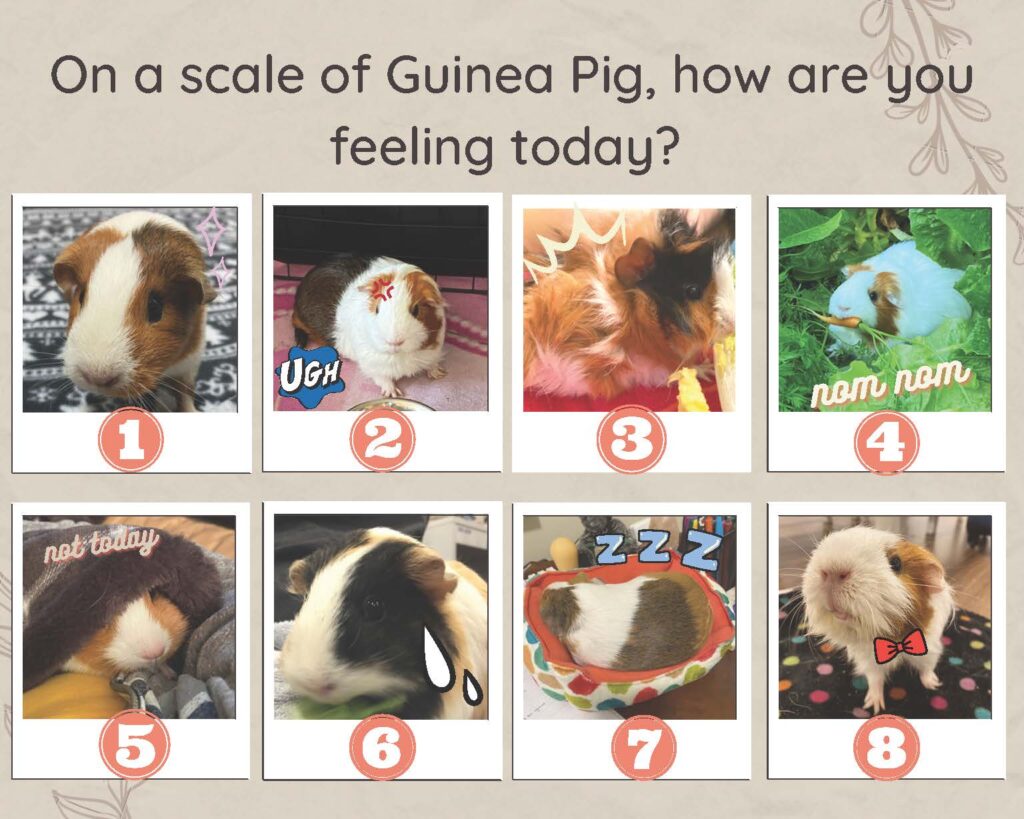
Check In taken from K Hickey

Joanna also gave us some fantastic tips for assessment.

-Assessment as learning: self-assessment, feedback and reflection. This tells you if students are understanding and have a deep level of comprehension.

-Teachers should give models of two of the proficiency scales: emerging and proficient.

-Educators and students should make their thinking visible on a whiteboard or chart paper while using technology.

-Educators should co-create rubrics.

-For self-assessment, get students to ask themselves: “What did I notice?” and “Where’s my stretch and where’s my strength?”

FreshGrade

FreshGrade is a digital portfolio platform that allows teachers, students and parents/guardians to connect and communicate with a focus on student learning. During my first practicum, I was in a kindergarten classroom with a teacher who used FreshGrade. For Kindergarten, the parents/guardians are very involved in their child’s learning, which leads to a lot of time spent communicating. By introducing FreshGrade, this educator made her workload a lot less hectic in terms of time spent interacting with guardians. When a student leads the morning routine, she would film the student and upload it to their profile. This allowed parents/guardians to see their children growing, learning, and showing their learning.

In terms of negatives, there are always concerns regarding the safety and privacy of student data. From a CommonSense Privacy Report, there are certain concerns that are unclear or lacking, such as “Personally identifiable information (PII) is collected” and “Unclear whether this product collects sensitive data.” For parents, guardians, and teachers, I would recommend reading the entire report and doing further research if you are concerned. Another concern for teachers is consent. Teachers have to get guardian consent to use this technology, which can be very challenging. On the flip side, the educator could spend all of the time and energy documenting and then uploading to FreshGrade only for the guardian to never look at their child’s profile. Overall, there are definitely positives and negatives to FreshGrade, but in terms of showing student learning to guardians, it is a fantastic tool.

Android Science Journal

Android Science Journal is a “pocket-sized lab that encourages students to explore how the world works, record data, document observations, and experiment like a real scientist.” Students can use their Android phones and the application to participate in different scientific experiments. This use of technology allows educators to engage students in their learning. There are modules for light, motion, sound, and electricity. As always, we must think of their security and privacy and guardians would have to consent to the use of this tool. As well, educators must consider if students even have access to an Android. However, it opens up a lot of possibilities for engagement in Science for students from K-12.

Educational Models: Flipped, Blended, and Multi-Access Learning

Photo by Annie Spratt on Unsplash

Flipped Learning

“Flipped Learning is a pedagogical approach in which direct instruction moves from the group learning space to the individual learning space, and the resulting group space is transformed into a dynamic, interactive learning environment where the educator guides students as they apply concepts and engage creatively in the subject matter.” (Flipped Learning Network)

The flipped learning model provides students with individualized learning opportunities. Each student is unique and works differently in different contexts. This model allows students to “move at their own pace and review what they need when they need to.” (Edutopia). As well, it opens up opportunties for teachers to work one-on-one with students to support their content learning.

Certainly, now that we have experienced COVID-19 and its lasting effects on our society, students are more frequently sick at home. This model gives students the ability “to catch up on missed lessons easily through the use of video and online course tools.” (Edutopia). The flipped learning model gives students more opportunties to learn in the ways that work best for them.

One of the biggest disadvantages is the lack of access for students in a variety of circumstances. Not every household has an electronic device available for a child to use for periods of time. One teacher explained a situation where this would not be possible: a single mother with four kids and the only device is a cellphone. During the height of COVID-19 and the lockdowns, this mother was incredibly stressed, while her children were unable to meet their educational requirements.

As well, digital learning does not suit every student, so flipping every classroom would negatively affect those students. In particular, as educators, parents and caregivers, we must be careful to encourage moderation when it comes to technology use. I certainly feel negative health effects when I spend all day on a computer, so to think of children with their developing brains and bodies… Personally, I would encourage students to take frequent breaks from technology and spend time outside being active.

Image taken from Edutopia

Multi-Access Learning

“Multi-access learning: a mix of modes, including a concurrent mix of face-to-face and online learners connecting synchronously via video, and asynchronous connection. The extent to which a learner has freedom to choose their mode varies.” (EdCan)

I feel it is super important for educators to design and run their classes with all students in mind. Multi-access learning allows for different types of entry points into the class. It may be virtual or in person, but this opens up opportunities for students who do not learn in the expected manner. For me, I think of my schooling history where I struggled to attend due to mental illness. With a multi-access model, I would have a lot more independence and opportunity to continue learning without the need of physically being in the classroom. It definitely opens up a lot of opportunties for disabled students to continue to engage with their learning.

This article from UVic gives educators suggestions on how best to support multi-access learning.

Blended Learning

“Blended or hybrid learning: a consecutive mix of face-to-face and online learning, with all learners being required to participate in each mode. (The term “hybrid” has been misused to refer to both concurrent and consecutive mixing of online and face-to-face components, making it unclear to learners what is expected of them.)” (EdCan)

The following pros and cons of blended learning comes from Guide to Schools.

According to the University of Waterloo, many instructors, parents and students favour blended learning because it can:

  • Increase the amount and quality of faculty-to-student and student-to-student interaction.
  • Help students prepare for class discussions or lab work.
  • Increase opportunities for active and collaborative learning and assessment before, during and after lectures.
  • Allow class time to be spent on active learning activities by shifting background or foundational content to the online environment.
  • Facilitate more varied and engaging media for presenting course material.
  • Address learning bottlenecks via new types of interactive and independent learning activities.
  • Allow students to access course materials when and where they want, at their own pace.
  • Help to create a sense of community in large classes.

While there are many benefits to blended learning, there are a few negatives to this style of education:

  • It relies heavily on technological dependence. Tech resources and tools need to be reliable, easy to use and up-to-date in order for the use of the internet to have a meaningful impact on the learning experience.
  • Flaws in course design can lead to student confusion and isolation if not properly executed.
  • IT literacy can serve as a significant barrier for students attempting to get access to course materials.
  • The flexibility of setting your own pace can result in students falling behind on reading and course materials if not adequately coached and supported.
  • Selecting the appropriate platform for each lecture can be time consuming for teachers who find themselves preparing both in-class and online seminars.

3D Design

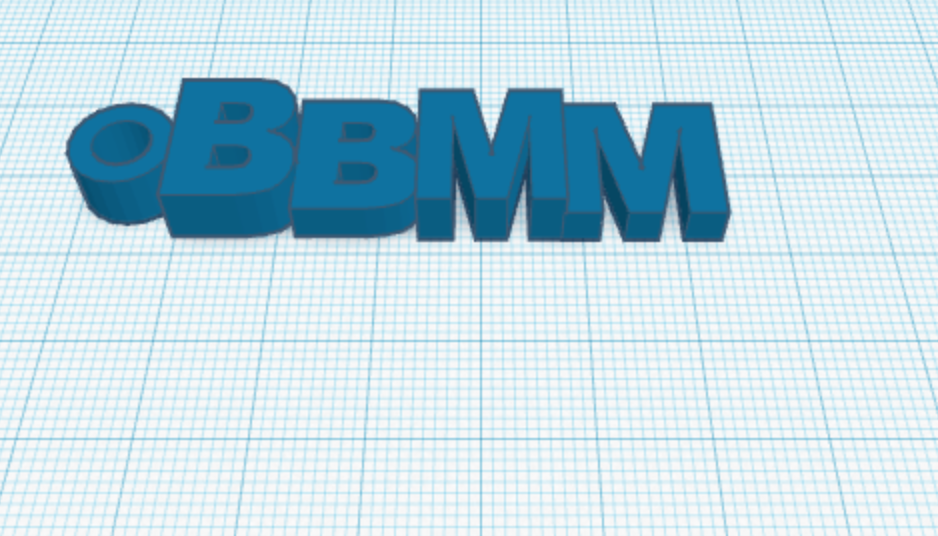
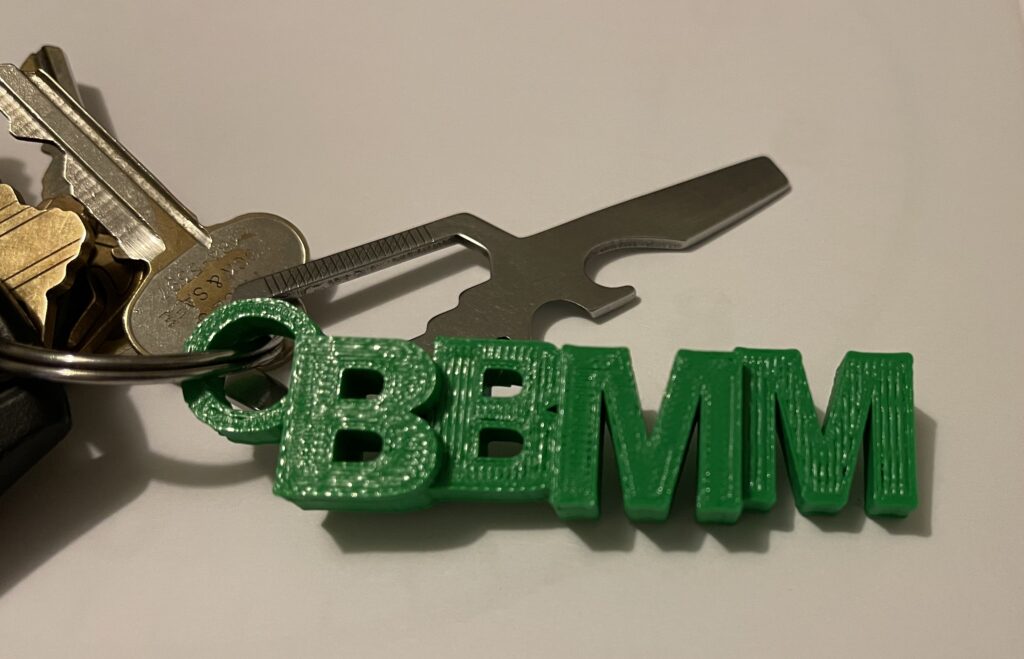
During the technology class, I was able to explore TinkerCad and create my very own 3D printed keychain. “Tinkercad is a free online collection of software tools that help people all over the world think, create and make. We’re the ideal introduction to Autodesk, a leader in 3D design, engineering and entertainment software.” (TinkerCad)

3D blue text with a circle followed by BBMM in a blue grid
Image of my 3D keychain design
Set of keys with a green 3D-printed keychain with the letters BBMM
Image of the final product

Cross-Curricular Coding and Computational Thinking

Computational Thinking

“Computational thinking is recognized as a key skillset for all 21st-century learners.” (SD61). It consists of four parts: Decomposition, Pattern Recognition, Algorithms, and Abstraction.

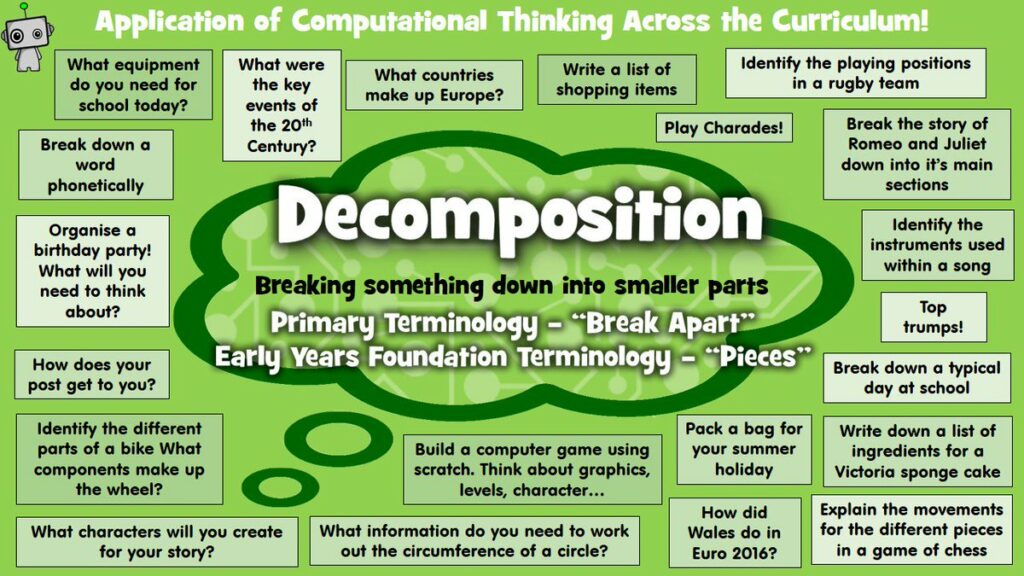
Decomposition

“Decomposition is one of the four cornerstones of Computer Science. It involves breaking down a complex problem or system into smaller parts that are more manageable and easier to understand. The smaller parts can then be examined and solved, or designed individually, as they are simpler to work with.” (Bitesize)

Image from SD61

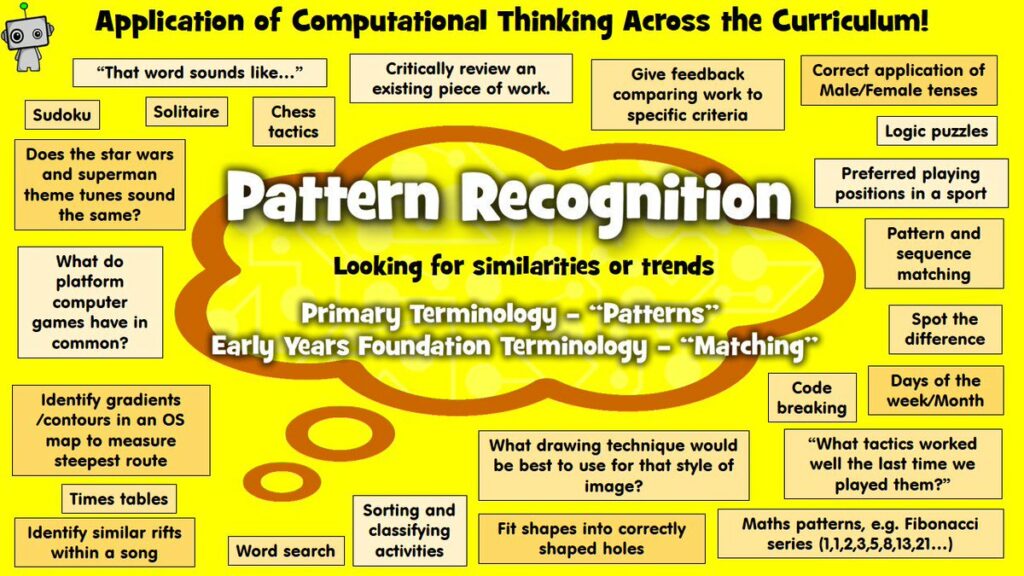
Pattern Recognition

Pattern recognition “involves finding the similarities or patterns among small, decomposed problems that can help us solve more complex problems more efficiently.” (Bitesize)

Image from SD61

Algorithms

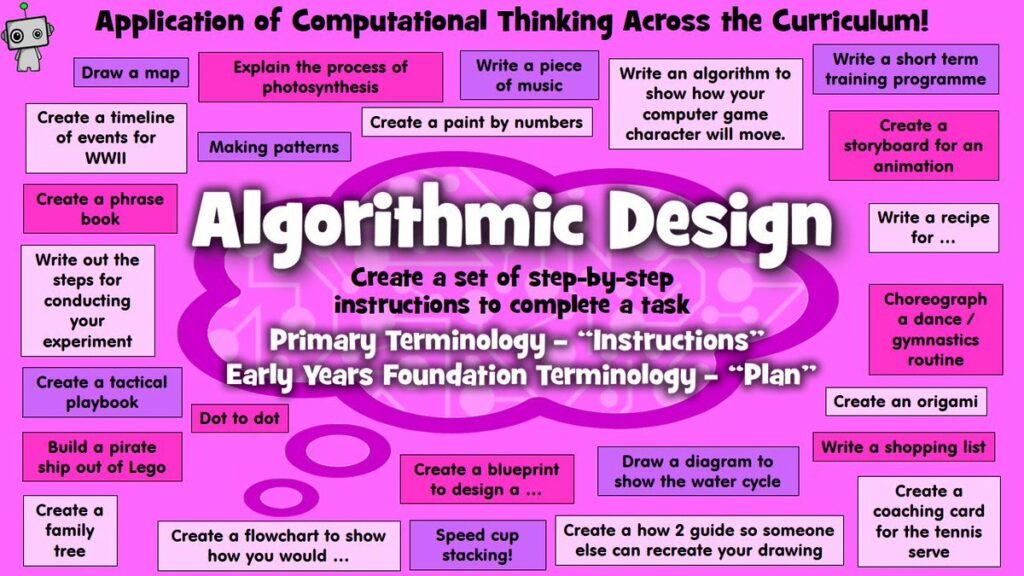
An algorithm is a plan, a set of step-by-step instructions to resolve a problem. In an algorithm, each instruction is identified and the order in which they should be carried out is planned.” (Bitesize)

Image from SD61

Abstraction

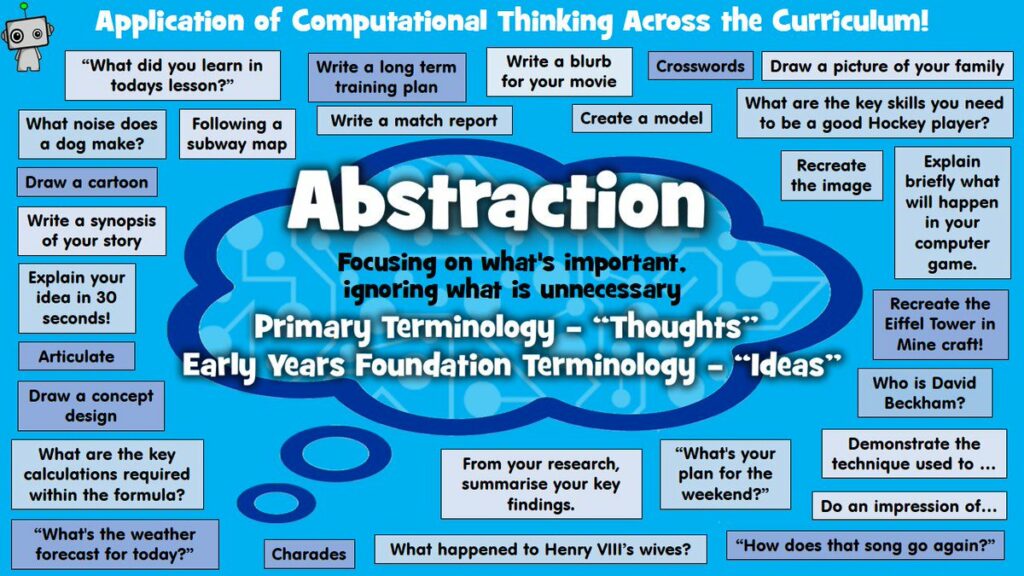
“Abstraction is one of the four cornerstones of Computer Science. It involves filtering out – essentially, ignoring – the characteristics that we don’t need in order to concentrate on those that we do.” (Bitesize)

Image from SD61

Can computation thinking help learners become better problem solvers?

“Computational thinking is the problem-solving skill of the digital world.” (Nick Pinder from ISTE). Any type of problem-solving thought process can be used in many different situations. By introducing students to computation thinking, they are able to use their newfound skills in a variety of contexts.

Photo by Van Tay Media on Unsplash

Are there any non-math-related opportunities for integrating coding and computational thinking into your grade level’s curriculum?

Although it is more common for coding and computation thinking to be heavily focused on math, there are plenty of resources in different subjects that align with the BC Curriculum. In particular, there are resources for language arts, science, history, fine arts, and music. Resource: ISTE

Examples:

Program-Pencil Code: Interactive Mad Libs

Lesson: Writing a Story

Lesson: Present Participle

Lesson: What is Data? – Introduction

Lesson: Patterns in the Periodic Table

Could computation thinking or coding turn math abstractions into concrete form for students with their inquiries at the grade level you’d like to teach?

Coding can turn math abstractions into concrete forms for students. In particular, this coding activity where you learn to code with Anna and Elsa was interesting and engaging activity to introduce students to geometry (from Hour of Code).

Video of Poem Art from Hour of Code

There are many unique resources that can help students better understand math abstractions. Hour of Code and CS First just to name a few.

Accessibility and Technology

Empty Japanese classroom with four rows of two-person wood desks surrounded by windows with sunlight shining in and wooden walls.
Photo by 2y.kang on Unsplash

Prior to this week, I had a basic understanding of digital accessibility. I am registered with the Centre for Accessible Learning and have seen all of the different types of technology students can use. However, most of the time when I think of accessibility, I think of a more broad view and relate it to physical accessibility related to physical disabilities, such as ramps, steps into buildings, etc. This really helped to expand my view of what accessibility means, bringing technology into the conversations I will have.

Five students working at same table on laptops.
Photo by Annie Spratt on Unsplash

Digital accessibility practices definitely need to be talked about more as I was fairly unaware of some of them. Before today, I had not been using the alternative text feature. I have started to notice more alternative text or image descriptions added to images. In particular, a lot of queer and disabled Instragrammers have added image descriptions to everything they post. This is such a simple way to create accessibility for all.


As an able-bodied person, I need to always be reflective and aware of how I present digital media, especially in terms of colour, audio, and visual. In particular, I will work on including alt-text, subtitles, headings, and full-text transcripts. In a way, this forces me to be more purposeful in my choice of media. I am most surprised by how digital accessibility needs to be discussed and taught to parents of disabled children. I can imagine it can be very overwhelming as a parent to have to navigate raising a disabled child. As teachers, it is our job to help these parents and guide them. In particular, giving them resources such as BC Ed Access.

Looking over the shoulder of a child who is using an iPad to play an education game.
Photo by stem.T4L on Unsplash


It is a fairly common reason why many digital accessibility practices aren’t more well-known or commonly used. Able-bodied people live a privileged life where they have no basis of understanding of what disabled people experience. I say this as one of these privileged people. It is important to always think from alternative perspectives and engage in discussion with disabled people. They are the best resources for their needs and experiences. As educators, we must always think from multiple perspectives and abilities. As well, we must actively seek out information and resources related to digital accessibility practices.

Youtube Video with Subtitles

Images and Alt-Text

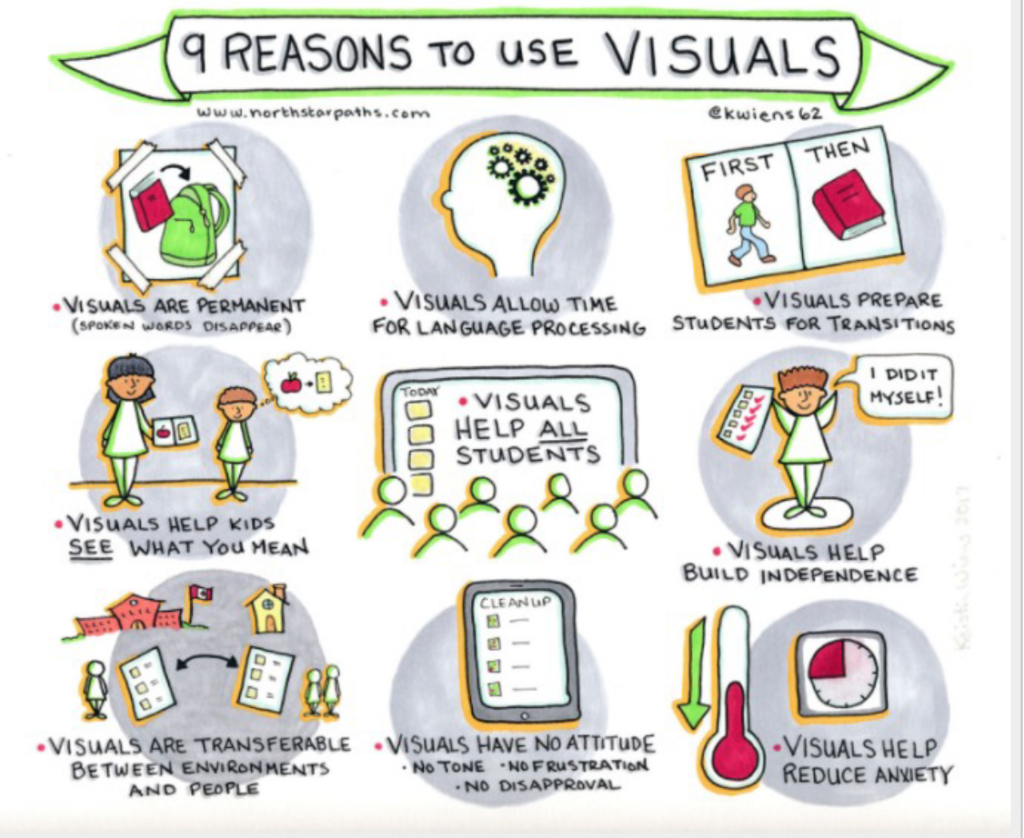
9 reasons to use visuals
Drawing of picture taped to wall with a green backpack and red book with arrow pointing from book into backpack. Words below image: Visuals are permanent (spoken words disappear)
Drawing of side view of head with gears where brain is. Words below image: visuals allow time for language processing.
Drawing of two pages, left side says FIRST and a person with a green shirt and blue jeans is walking, right side says THEN and a red book. Words below image: Visuals prepare students for transitions.
Drawing of teacher and student with teacher showing visual of apple and page. Student's thought bubble has same visual image of apple and page. Words below image: Visuals help kids see what you mean.
Drawings of 7 students facing a board with today's schedule. Words in image: Visuals help all students.
Drawing of student with paper with red tick marks on it and person has speech bubble saying, "I did it myself!" Words below image: Visuals help build independence.
Drawing of school with Canadian flag with a person below and a house with parent and child below. Between school and house is a piece of paper with information that is being transferred between environments. Words below image: Visuals are transferable between environments and people.
Drawing of an iPad with clean up at top and then list of items. Words below image: Visuals have no attitude. No tone. No frustration. No disapproval.
Final drawing of thermometer going down and image of circle with 1/4 shaded red. Words below image: Visuals help reduce anxiety.
Graphic by Sooke District Educator, Kristin Wiens, Inclusive Education Coordinator

EdCamps: Parent Communication and Naturalism in Schools

EdCamps are free public events or “unconferences” where educators are given the opportunity to collaborate and connect in an informal setting. Attendees provide options for topics and then the most popular are chosen. There is a focus on group expertise, tech tools, and instructional design. Each session involves a facilitated discussion among peers. The tenets of the EdCamp model are: free and open to all; participant-driven; experience, not experts; rule of two feet/clicks; and vendor-free.

If you want to learn more about EdCamps, please read this Edutopia article and explore the Digital Promise website.

Parent Communication

One EdCamp topic discussed was Parent Communication, an important topic for educators worldwide. It was very valuable to hear others’ experiences and ideas relating to parents. In particular, I connected with the idea of calling student’s guardians the “home team” as this is more inclusive. As educators, we do not need to add to the heteronormativity and the gender binary. By using this more general term, educators show students that the people raising them are part of a team that defies the usual nuclear family that was pushed in the past.

Photo by NeONBRAND on Unsplash

Another suggestion was to start the year off by sending an initial letter to the home team letting them know your practices so as to avoid unnecessary questions. As well, I feel this is valuable for the development of a positive teacher-home team relationship. It is important for educators to communicate with the home team about both positive and negative aspects of their child’s educational journey. This might mean weekly emails with highlights that communicate the highlights of what happened in the week for their children. To make this easier, a template could be used such as “Need to Know/Want to Know/Nice to Know”. Another important way to create a positive relationship with the home team is to show them that you like their child. This can be done by sharing progress, giving updates about their child, and showing them in some way that you care about how their child is doing in your class. This may look like a Good News phone call when they achieve something positive.

Photo by Jerry Wang on Unsplash

It is important as an educator to remember that you never need to defend your pedagogical practices used in your classroom. As well, make sure to keep a paper trail of all communications with the home team as a record of what has been discussed and happened. Another really smart idea brought up is that you should wait at least 24 hours to respond to an email that really upsets you. This allows you to reply with a clearer perspective and a calmer mind. This adds to the idea of professionalism because as upset as we may be, we are professional educators teaching children. We must act respectfully and appropriately to our students and their home team.

Photo by Sigmund on Unsplash

Another fantastic idea discussed was that if a home team brings up a concern via email or phone, the educator should invite them into the classroom for a face-to-face meeting to clarify the situation. I always find speaking to someone in person much easier and clearer than back and forth over email or phone. I would rather talk to someone in person to make an appointment than calling them on the phone. I will definitely make an effort to meet with parents face to face. It avoids the back and forth that occurs with emails and phones and it reminds both sides that they are talking to a real person. This can be especially valuable for more sensitive subjects. If you are concerned, you can always ask a backup person to attend the meeting with you.

Communication with home teams is important for educators so they are reminded of cultural considerations and the different types of home environments. Some behaviours stem from these, so it provides educators with insights.

Photo by Yogendra Singh on Unsplash

Now, it is your turn, reader. What are your ideas related to parent communication in schools? Do you have any great tips or tricks for other educators?

Naturalism in Schools

Photo by Florian van Duyn on Unsplash

The second topic discussed was naturalism in schools, which can be connected to the Indigenous ways of knowing and doing. A huge aspect of Indigenous beliefs centers around the land. To honour this, we, as educators, need to bring more naturalism into our pedagogy. Nature walks are a fantastic activity to integrate naturalism into the curriculum. One person suggested connecting with Mycological societies that provide education on plant identification and other topics, which then can be transmitted to students. Another activity that connects students with the land is by mixing art and natural materials. The class would go out and collect materials in an ethical way and then use those materials to create art. These activities connect Indigenous traditions and perspectives with art and science. In particular, educators must focus on the local nature and Indigenous traditions.

Photo by Milk-Tea on Unsplash

There are many resources in the community that educators can connect with to have them come into the classroom and also many locations for the class to visit. Learning in nature allows students to learn in an enjoyable and low-barrier environment. Another way to bring naturalism to the classroom is to participate in a community or school garden. Children are more likely to enjoy vegetables if they participate in the process of their growth. This also provides an opportunity for group nutrition education related to biology units in the curriculum. A great resource in Victoria is the Compost Education Center, which has amazing presentations and tours of their center. They even have a fish tank that uses recycled water from a native plant garden.

Photo by Markus Spiske on Unsplash

Another way to introduce naturalism in the classroom is to bring different organisms into the classroom, such as plants, aquariums and terrariums. Finally, educators should facilitate discussions that elicit student knowledge and create a classroom environment that is open to sharing in a respectful manner. Children love to learn about the natural world and already have experience and knowledge.

Photo by Ben Lei on Unsplash

Again, reader: what are your ideas related to naturalism in school? How can educators integrate more naturalism into the classroom?

Educators and Technology

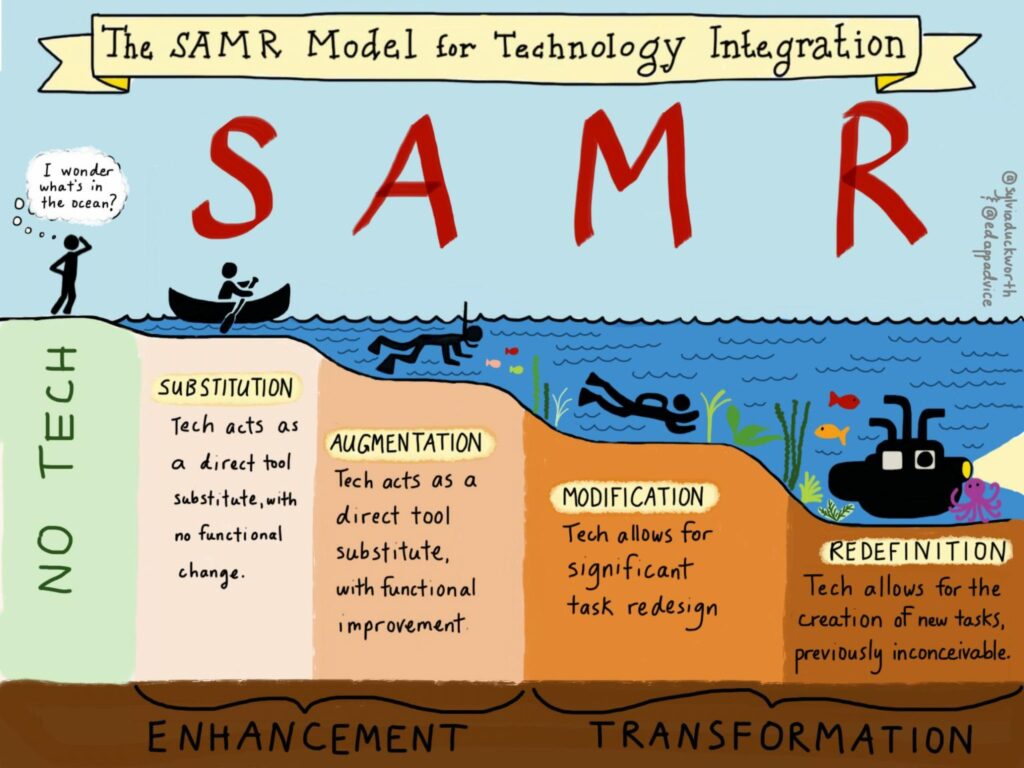
The SAMR model, developed by Ruben Puentedura in 2010, is used as a tool to think about technology integration and the best uses of EdTech. As an educator, it is valuable to look at how you are using technology in your classroom and how it affects learning.

SAMR model, illustrated by Sylvia Duckworth

The model has a hierarchy of tech uses in online learning, which increases in sophistication and added benefits: Substitution, Augmentation, Modification, Redefinition. The first two tiers enhance learning, while the final two tiers transform learning. It is important to think of it more like a spectrum in which each tier has a time and place. Rather we want to choose which tier based on what we want to achieve and the type of learning that will be elicited. If it is possible to reach redefinition, then that is a huge step for students to take ownership of their learning and technology use.

“Substitution” occurs when the tech acts as a direct tool substitute, with no functional change. An example of this would be students going from pen and paper to word processing. There are no added features, just a similar function. “Augmentation” occurs when tech acts as a direct tool substitute, with functional improvement. In this case, having students use a word processor with spell check and other tech tools would be considered augmentation as there is substitution but with improvement. “Modification” occurs when tech allows for significant task redesign. This means that there is considerable change in the use of technology. An example would be students using Google docs for writing which allows them to share their documents with each other and provide feedback within the Google doc. Now, the students are able to also interact with each others’ writing. Finally, “redefinition” occurs when tech allows for the creation of new tasks, previously inconceivable. A great example would be a project that involves students filming, and editing a video of themselves relating to the topic. This is such an immersive and engaging task that transforms the learning process.

The SAMR theory of technology adoption pushes educators to question and reflect on their uses of technology. I feel that at times we can be lazy and simply use substitution. So, this model forces us to think about how to create more rich tech learning opportunities. If you would like to learn more, this article was helpful.

Photo by Microsoft 365 on Unsplash

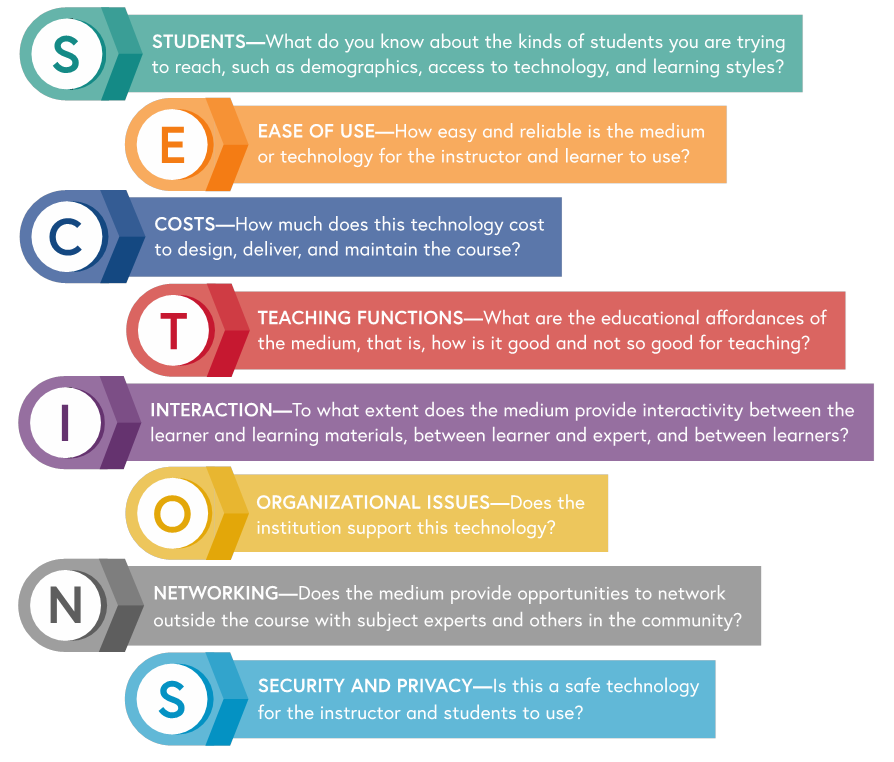
Another important model to consider as an educator that uses technology is the SECTIONS model, developed by Tony Bates and Gary Poole. This model provides a set of criteria and questions that help guide educators on what types of technology and media to use that best suit their students and the taught concepts. SECTIONS stands for: Students, Ease of Use, Costs, Teaching Functions, Interaction, Organizational Issues, Networking, Security and Privacy.

 Sheila Jagannathan, World Bank, 2020

“Students” pushes educators to consider their students during the selection process of media and technologies. In particular, there are three issues to consider: student demographics, access to technology, and student learning styles. You wouldn’t ask kindergartners to use advanced technology, right? As educators, we must always look to our students to personalize their education in the most effective ways. For “Ease of Use”, educators must think about the technical skill that either is already known or must be taught. It would be a waste of time to choose a technology that students spend the entire class attempting to figure out how to use. An easy-to-use, quick and reliable technology or media is the best choice to enhance learning. This is mostly thought of for subjects not related to technology. It is important that educators consider their class’ digital literacy when choosing technology or media.

“Costs” relate to all of the expenses encountered such as money and time. It is important to think about how much the technology will cost to design, deliver, and maintain. As well, educators must think about their students and the scalability of the technology. “Teaching Functions” consists of exploring the educational affordances of the technologies and media. It is valuable to look at the learning outcomes, concepts, and think about how the use of this particular technology will enhance learning rather than detract. Anyone can use technology, but will it be the most effective for students’ learning?

“Interaction” looks at how the media or technologies create opportunities for students to be fully engaged and active in their learning. There are three types of interactivity that need to be promoted: between learner and learning materials, between learner and teacher, and between learners. There are interactive characteristics of media and technologies: inherent interactivity, designed interactivity, and user-generated interactivity. As educators, thinking about the interactivity of the technology being used is critical for creating a valuable learning experience for students. “Organizational issues” focus on issues surrounding the institutions of learning. In particular, it looks at the way the institution structures teaching activities, the instructional and technology services already in place, and the support provided by the institution.

“Networking” relates to how students can engage in discussion and relationship building with relevant people in the subject field and community. This is especially important in university environments as these students generally intend on continuing in the field of study. It allows for students to pursue their interests and find like-minded people and subject specialists. “Security and Privacy” relates to the need and right for privacy and security. Basically, teachers and students need to be able to freely express opinions, explore technology, specifically the Internet, in safe ways, and be protected from online harassment and bullying. In particular, the collection of personal data for commercial companies and target marketing should not happen in a learning environment and people deserve their privacy to be respected. Part of this involves teachers promoting safe technology habits for students. Institutions also need to strictly control the privacy and security of their technologies.

This model is super thorough and encourages educators to really think and reflect on their selection of technologies. By considering each of these facets of the SECTIONS model, you will be confident in your pedagogical choices related to the learning objectives.

For further information, I would highly recommend reading chapter 8 of Teaching in a Digital Age by A.W. Bates (2015).

Photo by Lesia and Serhii Artymovych on Unsplash

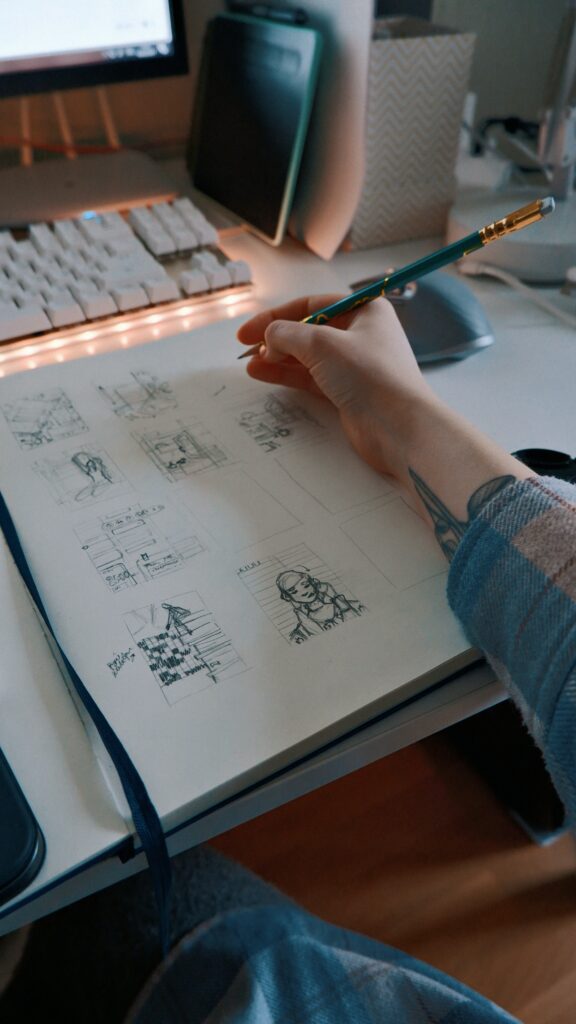
Sketchnoting is a type of note-taking that involves more visual types of notes, especially drawing in sketch form. It is less intensive than word-for-word note-taking and has positive effects on memory retention. By combining both words and visuals, sketchnoting activates multiple parts of your brain that would normally be dormant. In a way, it allows you to customize your note-taking process and gives students an opportunity to take notes in a doodle fashion. As well, I think of students with learning differences, such as ADHD, who would greatly benefit from this strategy.

Thinking about this strategy for younger students, I think it can really benefit their learning as it provides them with a medium for note-taking without the stress of writing out words. It would be suitable for students in grade 3 or up in my opinion. Of course, educators must choose good concepts for this strategy. An example would be in ELA for students to create a sketchnote related to the elements of stories. If you wish to read more about sketchnoting, I found this article helpful.

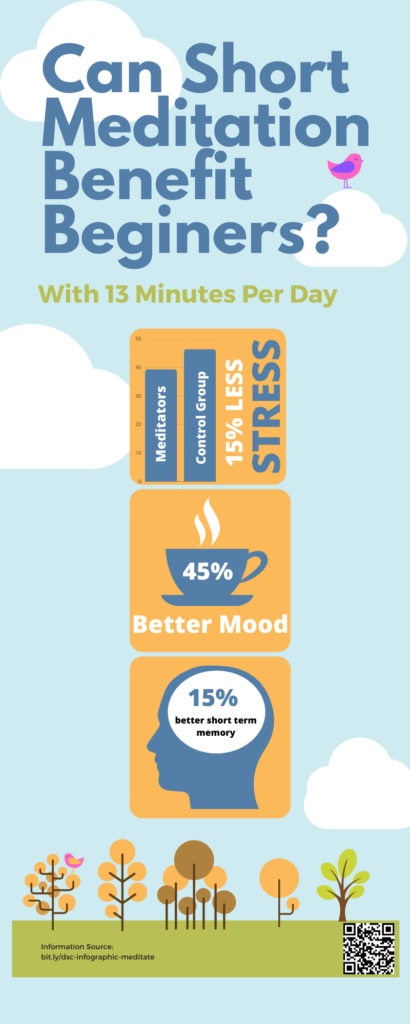
Infographics are great tools for educators and students to convey information. “An infographic is a form of visual communication means to capture attention and enhance comprehension.”-Josh Ritchie. For an assessment tool, students could create their own infographics. Educators can use it to help students with difficult topics.

Example of Infographic

Creative Commons, Digital Footprints, and Video Editing

Photo by Marvin Meyer on Unsplash

Creative Commons is a nonprofit organization that allows for the sharing and reuse of creative works around the world. Creative Commons licensed materials are for use under generous, standardized terms. Using Creative Commons licensed materials will be super beneficial for teachers as they do not need to spend money to create or allow students to create learning materials. As a teacher, I can use different CC-licensed media to embellish how I teach. It could be through the creation of a video or the use of images.

The CC licenses are clear on how users can use their work. For example, the audio track I used in the ballerina video cannot be used on Youtube. This is because Youtube tries to monetize all content and when publishing on Youtube, the video must be under CC-BY (or the Youtube licence), which then renders the use of music under other CC-licenses useless/illegal. I find this very interesting and an important note for me to be very careful about how I publish media and that I need to read very carefully. I made a conscious choice to post my ballerina video directly through my WordPress blog.

Photo by Sara Kurfeß on Unsplash

A digital footprint is the trail of data an Internet user leaves. It is also called a digital shadow or an electronic footprint. This trail can include websites, emails sent, and information submitted online, such as in forms. This digital footprint occurs for all users even if they are not actively aware they are creating one. It is important to be aware that these footprints are relatively permanent. For children, this is an important concept for parents and teachers to convey. I cannot help but think about our younger generation’s internet use and how at times it can be quite impulsive and have long-term effects they do not understand. Some of this is from my own experience… I wish I had been taught about digital footprints much earlier in my life, so I could be even more careful. If you want to read more about digital footprints and how to protect yourself, this article is super helpful.

For our students, I think it is incredibly important to establish the concept of digital footprints early on when they are introduced to the Internet, especially social media. A possible idea would be to send a newsletter home for students and their families. Another important way to help students manage their digital footprint is to hold discussions about digital footprints, online privacy, safety, bullying and consent.

This idea of digital footprints and internet safety and security became far too real for me this week as my Instagram account was hacked by a Bitcoin scammer in Nigeria. When I Googled myself, my Instagram was the second hit, which really frustrated me as it was held hostage at the time! I am back in my account and have made sure it is very secure. It definitely opened my eyes to how easy it is to get hacked and I will definitely share this knowledge with my students. Otherwise, Googling myself was fairly boring. It mostly showed me that I need to actually log in to my LinkedIn account and actually add useful information.

After the Zoom session with Jesse Miller, I feel that I will definitely change how I view social media. I even had a moment recently where I thought to myself, “I need to post in a smart way.” I ultimately changed the language in my post and then later my partner suggested I use a certain word, to which I responded with “I am trying to have a positive, clean presentation on my social media.” It certainly is important as a teacher with students on social media looking for their teachers. I am certainly keeping my Facebook and Instagram accounts private from now on.

During this week’s class, we worked on video editing techniques, such as slow-motion, time-lapse, and green screen. I created a slow-motion video using a video by Anastasia Shuraeva from Pexels and music by Walt Thisney.

Video creation is a unique learning resource and activity that can help learners become engaged in their learning. It definitely has a time and a place in learning. It is best introduced to students in grades four and up in my opinion as they will have basic computer skills. A brilliant idea for an ELA activity is for students to create videos based on literature circle books or to create plays or reader’s theatre in video formats. Video creation can be used in any subject or across multiple subjects. It is always important to consider curricular competencies and learning objectives. As well, it is important for students to have provided consent for filming. For my faithful readers, what do you think of video creation in the classroom and its possible benefits and drawbacks?

Photo by Compare Fibre on Unsplash

Multimedia Learning, H5P, and Screenscasting

Photo by Corinne Kutz on Unsplash

Multimedia Learning Theory, which falls under the theory of Cognitivism, consists of three assumptions. The first states that humans possess dual channels, namely audio and visual, for information processing. This is known as the multimedia principle, which states that learners may learn better with both words and pictures, rather than just words. The next assumption is that each channel has a limited capacity for information processing. Human’s working memory can only handle 7 units (+/-2) at any given time. The final assumption maintains that humans learn through an active processing of filtering, selecting, organizing and integrating these new models with existing knowledge. All of this plays into how teachers instruct with multimedia, especially presentations. Richard Mayer originally developed Multimedia Learning Theory and posited 12 principles, which include: Coherence, Signaling, Redundancy, Spatial Contiguity, Temporal Contiguity, Segmenting, Pre-Training, Modality, Multimedia, Personalization, Voice, and Image.

Multimedia Learning Theory should be considered when teachers create instructional videos and tutorials so as to provide an effective learning tools. The Modality Principle suggests that if there are on-screen images, the instructor utilizes narration instead of text as it overwhelms the visual channel. Think: words and pictures, instead of words and text. The Redunduncy Principle suggests that instructors should include pictures and spoken word, rather than pictures, text and spoken word. This also can overwhelm the cognitive load, impeding learning. Finally, the Coherence Principle suggests that instructors design multimedia presentations with the least amount of extraneous information, such as information that will not be assessed. It is important to think about how we convey information to our students.

Overall, I find this theory to be quite illuminating as it makes me think about how to present information to students. Thinking back on past lectures, I have to say that I tend to become overwhelmed by my cognitive load. As someone with a sensory processing disorder, I do not learn very well from auditory teaching as it takes me too long to process while the instructors speak too quickly without break. An interesting idea would be to go to the next slide, pause to give people time to read the slide and then continue instructing orally. I do think it is dependent on the students in the class.

boy in black crew neck shirt
Photo by Thomas Park on Unsplash

H5P is an interactive HTML-5 video content type that allows users to add multiple choice questions, fill in the blanks, pop-up text, and other interactions to create engaging learning content. For middle school, this is a great tool to create content for students to interact with and learn from. As a way to make sure students attend to the information in the video, I would add different question types. The great part is that you can make it pause the video when an interaction pops up. A possible assignment that would make use of video editing would be either in Science or Social Studies. An example of a BC Grade 7 Social Studies assignment would be to make a short video about anthropological origins of humans. I really enjoy the idea of the students filming themselves acting it out. I do not believe that it would be as useful for younger grades, especially the primary grades. A pop-up text would be fun and interactive, but may be more distracting than informative.

BC SPCA is a great resource when looking to add a new pet to your family. Here is a short tutorial on how to find specific types of adoptable animals, such as guinea pigs. To create this video, I utilized H5P and screencasting.

References:

Reimagining Education and Personal Learning Networks

As educators, we need to view education as dynamic and constantly evolving. Education needs to be reimagined as society itself changes. Our schools are not in a vacuum, but rather are affected by society, including the technological advances. As new technologies are developed, we must adapt them for educational purposes where applicable. As well, we must reimagine what we are bringing into education. A more holistic approach may include bringing multiple perspectives and diversities. Of course, it is easy enough to say what we need to do, but change can be challenging and face criticism. This may come from parents, administration or opinionated citizens. People react in fear to change because it is different and new. To enact change, educators need to work together and communicate openly and freely, while using robust evidence.

From my personal education experiences, I feel excited about the idea of a reimagined education. I think back on many moments during my schooling where the education system failed me and I see how it can and has changed for the better. At the root of all of this are the children, our students, who must always be put first. Even with my excitement, I definitely have concerns, especially at the post-secondary level. These institutions run as businesses at this point and it does not seem probable that they would enact change unless it leads to monetary gain. Part of this issue is that the secondary system feeds into the post-secondary system, which means that change must include all levels. I am thinking in particular of SATs and other standardized entrance exams, which do not promote communities of learners.

I pose this question to my readers: How do you think we can reimagine education?

Photo by Clark Tibbs

What is a Personal Learning Network?

Personal Learning Networks (PLNs) are systems of connections in which learning and interactions occur. “Your PLN is where you gather, collect, communicate, create and also share knowledge and experience with a group of connected people, anywhere at any time.” –Karla Gutierrez. Often, these networks are developed through social media, such as Facebook, Twitter, LinkedIn, and other platforms. It is a way to reach a range of people from diverse backgrounds and partake in professional development.

Potential Benefits of Developing a Robust PLN:

  • Access to many information sources and pathways
  • A network for professional development that caters to your specific needs that is always available
  • Access to up-to-date information in your field from experts
  • A continuous stream of learning, resources and ways of thinking
  • Ability to seek advice and answers in a speedy manner
  • PLNs increase your reach across the world due to technology.
  • Allow you to attend events virtually
  • Provide opportunities to expand your thinking through active discussion
  • Access to expert advice on demand

First Blog Post

  • Setting up this blog was not as challenging as I expected.
  • The biggest issue was waiting for the website to be set up.
  • I am excited to use this blog as a catalogue of my learning, teaching resources, and whatever else I discover.
  • At this point, I am interested in teaching primary grades. An idea to make this more accessible to the students would be to create the blog together and have each student add their own posts. I think it can be possible to engage in this type of technology even in the primary years.
  • This course reminds me of past computer science courses I have taken.

© 2026 Let's Learn!

Theme by Anders NorenUp ↑