The SAMR model, developed by Ruben Puentedura in 2010, is used as a tool to think about technology integration and the best uses of EdTech. As an educator, it is valuable to look at how you are using technology in your classroom and how it affects learning.
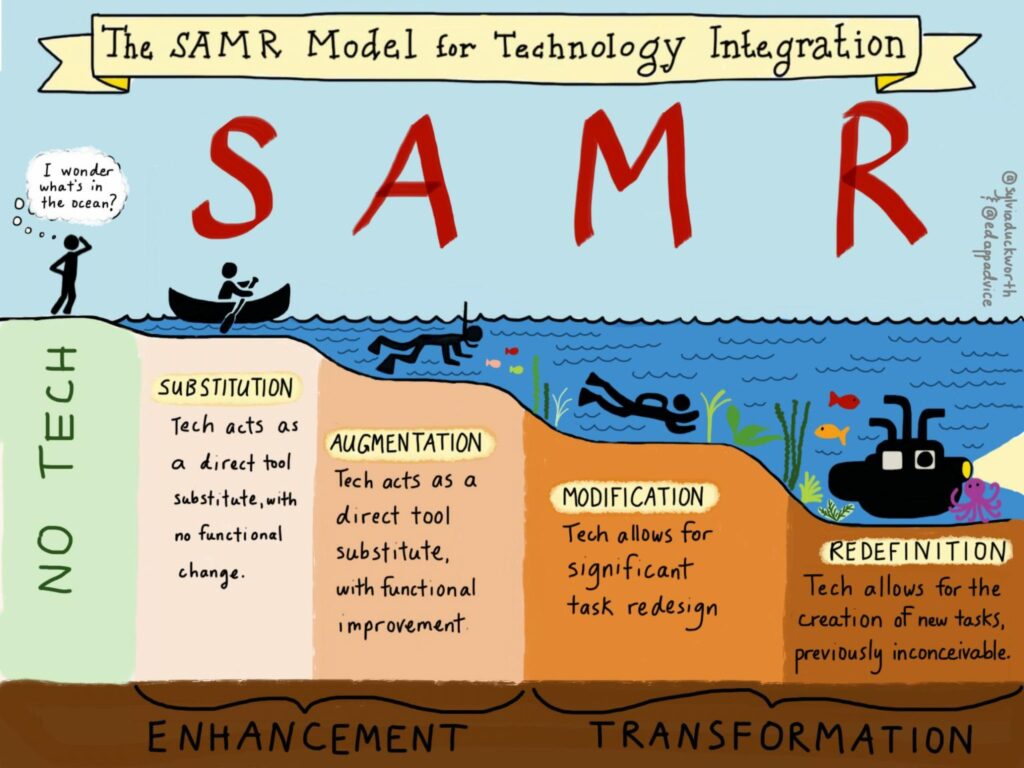
The model has a hierarchy of tech uses in online learning, which increases in sophistication and added benefits: Substitution, Augmentation, Modification, Redefinition. The first two tiers enhance learning, while the final two tiers transform learning. It is important to think of it more like a spectrum in which each tier has a time and place. Rather we want to choose which tier based on what we want to achieve and the type of learning that will be elicited. If it is possible to reach redefinition, then that is a huge step for students to take ownership of their learning and technology use.
“Substitution” occurs when the tech acts as a direct tool substitute, with no functional change. An example of this would be students going from pen and paper to word processing. There are no added features, just a similar function. “Augmentation” occurs when tech acts as a direct tool substitute, with functional improvement. In this case, having students use a word processor with spell check and other tech tools would be considered augmentation as there is substitution but with improvement. “Modification” occurs when tech allows for significant task redesign. This means that there is considerable change in the use of technology. An example would be students using Google docs for writing which allows them to share their documents with each other and provide feedback within the Google doc. Now, the students are able to also interact with each others’ writing. Finally, “redefinition” occurs when tech allows for the creation of new tasks, previously inconceivable. A great example would be a project that involves students filming, and editing a video of themselves relating to the topic. This is such an immersive and engaging task that transforms the learning process.
The SAMR theory of technology adoption pushes educators to question and reflect on their uses of technology. I feel that at times we can be lazy and simply use substitution. So, this model forces us to think about how to create more rich tech learning opportunities. If you would like to learn more, this article was helpful.

Another important model to consider as an educator that uses technology is the SECTIONS model, developed by Tony Bates and Gary Poole. This model provides a set of criteria and questions that help guide educators on what types of technology and media to use that best suit their students and the taught concepts. SECTIONS stands for: Students, Ease of Use, Costs, Teaching Functions, Interaction, Organizational Issues, Networking, Security and Privacy.
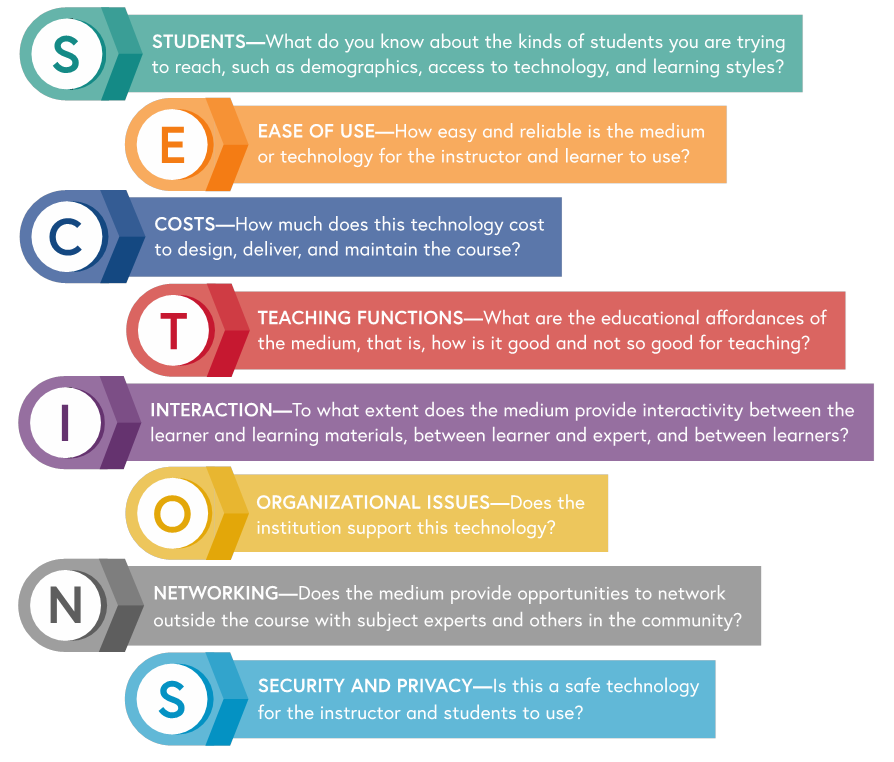
“Students” pushes educators to consider their students during the selection process of media and technologies. In particular, there are three issues to consider: student demographics, access to technology, and student learning styles. You wouldn’t ask kindergartners to use advanced technology, right? As educators, we must always look to our students to personalize their education in the most effective ways. For “Ease of Use”, educators must think about the technical skill that either is already known or must be taught. It would be a waste of time to choose a technology that students spend the entire class attempting to figure out how to use. An easy-to-use, quick and reliable technology or media is the best choice to enhance learning. This is mostly thought of for subjects not related to technology. It is important that educators consider their class’ digital literacy when choosing technology or media.
“Costs” relate to all of the expenses encountered such as money and time. It is important to think about how much the technology will cost to design, deliver, and maintain. As well, educators must think about their students and the scalability of the technology. “Teaching Functions” consists of exploring the educational affordances of the technologies and media. It is valuable to look at the learning outcomes, concepts, and think about how the use of this particular technology will enhance learning rather than detract. Anyone can use technology, but will it be the most effective for students’ learning?
“Interaction” looks at how the media or technologies create opportunities for students to be fully engaged and active in their learning. There are three types of interactivity that need to be promoted: between learner and learning materials, between learner and teacher, and between learners. There are interactive characteristics of media and technologies: inherent interactivity, designed interactivity, and user-generated interactivity. As educators, thinking about the interactivity of the technology being used is critical for creating a valuable learning experience for students. “Organizational issues” focus on issues surrounding the institutions of learning. In particular, it looks at the way the institution structures teaching activities, the instructional and technology services already in place, and the support provided by the institution.
“Networking” relates to how students can engage in discussion and relationship building with relevant people in the subject field and community. This is especially important in university environments as these students generally intend on continuing in the field of study. It allows for students to pursue their interests and find like-minded people and subject specialists. “Security and Privacy” relates to the need and right for privacy and security. Basically, teachers and students need to be able to freely express opinions, explore technology, specifically the Internet, in safe ways, and be protected from online harassment and bullying. In particular, the collection of personal data for commercial companies and target marketing should not happen in a learning environment and people deserve their privacy to be respected. Part of this involves teachers promoting safe technology habits for students. Institutions also need to strictly control the privacy and security of their technologies.
This model is super thorough and encourages educators to really think and reflect on their selection of technologies. By considering each of these facets of the SECTIONS model, you will be confident in your pedagogical choices related to the learning objectives.
For further information, I would highly recommend reading chapter 8 of Teaching in a Digital Age by A.W. Bates (2015).

Sketchnoting is a type of note-taking that involves more visual types of notes, especially drawing in sketch form. It is less intensive than word-for-word note-taking and has positive effects on memory retention. By combining both words and visuals, sketchnoting activates multiple parts of your brain that would normally be dormant. In a way, it allows you to customize your note-taking process and gives students an opportunity to take notes in a doodle fashion. As well, I think of students with learning differences, such as ADHD, who would greatly benefit from this strategy.
Thinking about this strategy for younger students, I think it can really benefit their learning as it provides them with a medium for note-taking without the stress of writing out words. It would be suitable for students in grade 3 or up in my opinion. Of course, educators must choose good concepts for this strategy. An example would be in ELA for students to create a sketchnote related to the elements of stories. If you wish to read more about sketchnoting, I found this article helpful.
Infographics are great tools for educators and students to convey information. “An infographic is a form of visual communication means to capture attention and enhance comprehension.”-Josh Ritchie. For an assessment tool, students could create their own infographics. Educators can use it to help students with difficult topics.

Leave a Reply
You must be logged in to post a comment.